
Returns are often described as a customer-service problem, but they also involve payments, inventory, shipping, and accounting. An automated email can acknowledge a request instantly while the actual parcel sits unidentified at a warehouse. Successful Shopify returns and exchanges automation connects those stages instead of accelerating only the first one.
The objective is a process customers can understand and staff can trust. Routine requests should move with little manual copying, while exceptions reach someone with the right authority. Refunds and stock changes should follow evidence, not merely the arrival of a form submission.
This guide explains how to design that workflow for an operating store. It provides implementation questions and testing methods rather than prescribing one universal return policy. Align the policy itself with your products, customer commitments, and applicable requirements before configuring rules.
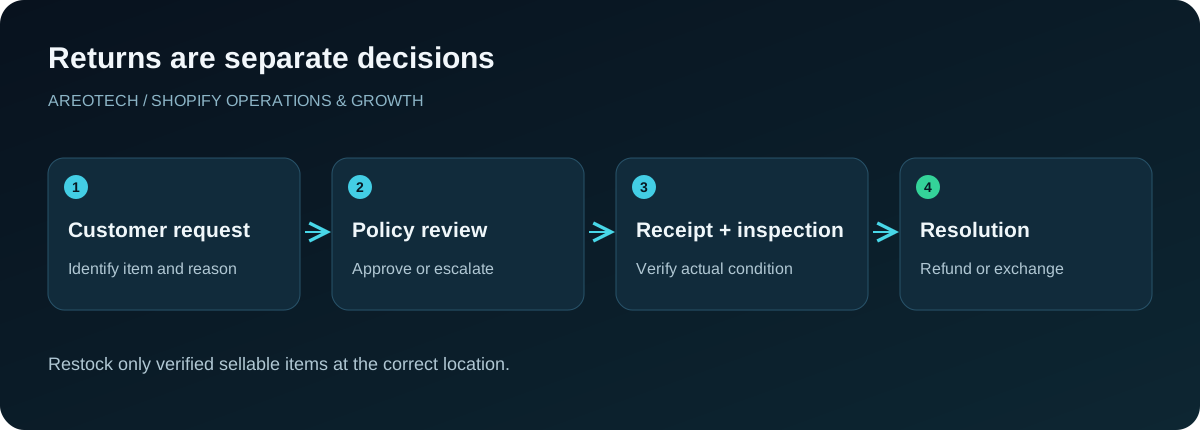
Separate the events in a return
Begin with a simple sequence: requested, reviewed, approved or declined, in transit, received, inspected, resolved, and closed. Your software may use different status names, but the underlying business events still need owners.
A request means the customer wants to return something. Approval means the business has authorized the next step. Receipt means a parcel arrived. Inspection establishes its contents and condition. A refund changes the financial record, while restocking changes sellable inventory.
Document which stages may happen together and which must stay separate. A low-value item might be refunded without physical return under an approved policy. That does not justify creating an inventory receipt for an item the warehouse will never receive.
Write the policy before configuring rules
List the eligibility window, product exceptions, required condition, return destination, shipping responsibility, and possible fees. Decide how staff handle gifts, promotional bundles, damaged deliveries, and missing items. These decisions should be understandable without reading an automation diagram.
Then compare the written policy with the capabilities exposed by your store. Shopify's return rules documentation describes platform controls for eligibility and fees. Use it to identify what can be configured directly and what requires a reviewed exception.
Do not let a software default silently become the business policy. If the interface cannot represent a legitimate distinction, choose an explicit manual review or suitable supported tool. Give customers accurate instructions about how to request help in that situation.
Verify what self-service actually supports
Self-service can reduce repeated requests for order numbers and return reasons. It does not mean every request should bypass review, and it does not guarantee the same capabilities as a specialist returns portal.
Check Shopify's self-serve setup guidance against your customer-account configuration. At the time of this review, it lists exchange requests as unsupported in the native self-serve flow. Avoid advertising a customer-led exchange journey that the configured interface cannot complete.
Test the account entry point from a delivered order email and on a phone. Staff should see exactly what customers see, including ineligible items and confusing empty states. A hidden return link can create support work even when the underlying rules are correct.
Collect information that changes the decision
Ask for the order, item, quantity, reason, and relevant condition details. Collect photographs only where they help assess a genuine issue. A long form full of optional questions can discourage customers without improving the team's decision.
Use reason codes that staff can interpret consistently. Separate fit, preference, damage, wrong item, and missing component where those categories lead to different actions. Provide room for a short explanation when the available choices do not describe the problem.
Avoid copying sensitive customer information into broad chat channels or public task trackers. A return reference and assigned owner usually suffice for an operational notification. Staff can open the authorized order system when they need personal details.
Route exceptions to the right owner
Define ordinary cases that support can approve and exceptions that require another team. Product safety concerns may need a specialist response; payment disputes may need finance; repeated wrong-item reports may indicate a warehouse issue.
Create an escalation queue with a reason, owner, and response target. An automation that adds a tag without anyone watching it has not routed the work. Test whether the assigned person receives enough information to act and can mark the issue resolved.
Keep the customer informed while an exception waits. A clear acknowledgement and realistic next update are more helpful than a generic approval message sent before review. Do not describe an unresolved request as completed simply to make a dashboard appear tidy.
Make shipping instructions operationally accurate
An approved request should explain the destination, packaging expectations, included items, and how to identify the return. If a label is supplied, verify the service, address, and parcel assumptions with the team receiving the goods.
Treat cross-border returns as a distinct workflow. Customers should receive approved documentation instructions, and staff should know where questions about duties or returned merchandise belong. Our Canada to US shipping guide explains why outbound and return journeys require separate planning.
Track label creation separately from carrier acceptance. A generated label does not prove the customer shipped the parcel. If reminders are appropriate, base them on the actual stage and stop them once the process advances or the request closes.
Give the warehouse a receipt process
The receiving team needs a return reference that connects the parcel to expected items. Define how to handle parcels with no reference, unexpected quantities, missing accessories, or several orders packed together.
Record the received quantity and condition before deciding what becomes available for sale. Use a designated holding process for items awaiting inspection. Otherwise, goods can re-enter pickable stock while support is still investigating whether they are damaged.
Rehearse the physical workflow with a sample parcel. Ask a staff member unfamiliar with the implementation to identify the order and record the outcome. Their questions often reveal missing instructions that the project team overlooked because it already knows the intended answer.
Treat exchanges as a new fulfillment commitment
An exchange can involve a different size, price, shipping method, or stock location. Confirm replacement availability at the point your business commits to sending it. A customer selecting a preferred size does not necessarily reserve that unit.
Shopify's returns and exchanges guidance describes the supported order workflow. Review how amounts owed, refunds, and replacement items are represented before connecting another system that creates orders independently.
Give support an approved alternative when the replacement sells out. That might be a refund, another suitable item with agreement, or a wait the customer explicitly accepts. Avoid sending an automatic exchange confirmation that the warehouse cannot fulfill.
Control financial actions deliberately
Define who can issue refunds and under what conditions. An integration may prepare a decision, but the authorization model should reflect the business risk. Keep higher-value or unusual requests in a review process where appropriate.
Check partial refunds, discounts, shipping charges, gift cards, and store credit using representative orders. The amount a customer remembers paying may differ from the amount allocated to one returned item. Staff need a clear explanation of the calculation and the approved outcome.
Require repeat-safe processing for custom integrations: receiving the same event twice should not produce two refunds. Record the original action identifier and current state before retrying. Financial operations deserve a recovery design, not an assumption that notifications always arrive once.
Assign inventory changes to one system
List every system that can restock: Shopify admin actions, a returns app, warehouse software, and custom automations. Decide which event authorizes the adjustment and which system performs it. Other systems should observe that result rather than independently applying the same change.
Test a refund without return, a returned damaged item, a sellable return, and an exchange. Each case can have a different inventory effect. Check the physical location as well as the quantity so a correct total does not conceal stock assigned to the wrong warehouse.
For sets and kits, use the bundle inventory guide to inspect component behaviour. Returning one component should not automatically restore a complete bundle when the remaining items never came back.
Design messages around customer questions
At each stage, ask what the customer needs to know next. A request acknowledgement should explain review timing. An approval should explain shipping. Receipt should confirm the parcel arrived. Resolution should explain the exchange shipment or financial action actually completed.
Use conditional content carefully. A refund message should not claim that funds are already visible in the customer's bank account. An exchange message should not promise dispatch before the replacement enters the fulfillment process.
Keep one owner for each notification. Overlapping Shopify, app, and helpdesk messages can contradict each other. Review the complete communication timeline with a test customer profile rather than approving each template in isolation.
Test the ordinary failures before launch
Build a matrix covering an eligible request, an expired window, a final-sale item, a partial return, a damaged parcel, unavailable replacement stock, and a repeated event. Include failed label creation or a disconnected warehouse integration where those systems are involved.
Record the expected customer message, staff task, financial effect, and inventory effect for each case. Verify all four. A test that checks only the portal's success screen can miss a duplicate restock or a refund that never happened.
Use a small controlled rollout and assign a reviewer to early cases. Preserve an easy way to pause automatic actions while continuing to accept customer requests. The business should still be able to help customers if one integration becomes unavailable.
Measure where time is actually spent
Track time from request to decision, approval to receipt, receipt to resolution, and resolution to closure. Separate customer waiting from internal processing. A long overall cycle may be caused by slow parcel transit rather than a support backlog.
Review unresolved cases by age and reason. Look for frequent manual corrections, missing references, duplicate messages, and reopened requests. These reveal practical weaknesses more directly than counting how many automation rules exist.
Use return reasons to inform product pages and fulfillment improvements. Repeated fit questions may call for better sizing information, while missing accessories may indicate packing instructions. Automation should make those patterns visible so the store can prevent avoidable returns.
Keep the process maintainable
Store the policy, status map, system ownership, test cases, and escalation contacts together. Update them when products, warehouse partners, or customer-account experiences change. A working flow can become inaccurate after a seemingly unrelated release.
Run a periodic sample from customer request through final stock and payment records. Ask whether another team member can explain every transition. If the answer depends on one person's memory, improve the documentation before expanding the automation.
AreoTech's Shopify automation service can help connect these operational stages and verify the exceptions. The useful result is a return process that reduces repetitive work while preserving accurate decisions about customers, money, and physical goods.