
A gift set can look simple on a Shopify product page while creating a complicated stock problem behind it. The same bottle might sell alone, inside a starter kit, and inside a seasonal package. If each offer claims an independent quantity, customers can buy more bottles than the warehouse owns.
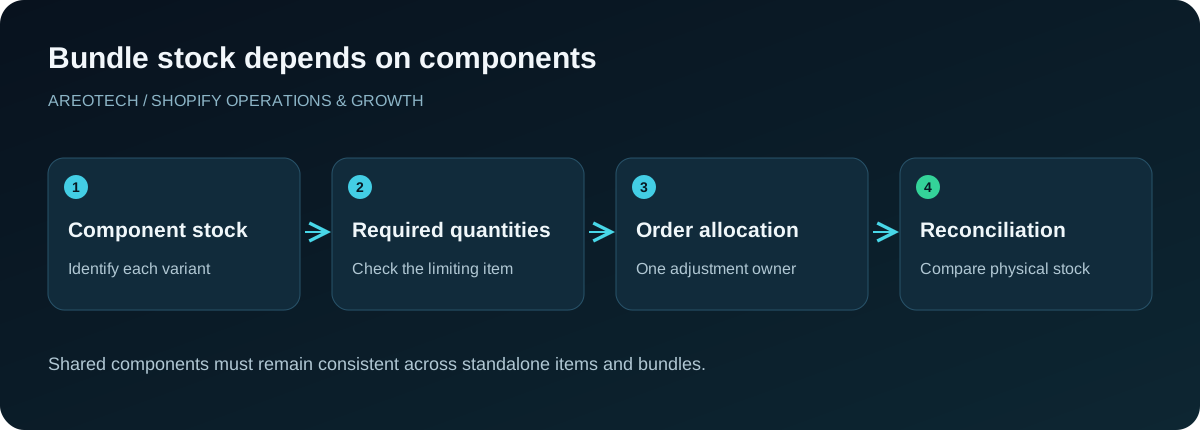
Reliable Shopify bundle inventory sync starts with the physical items, not the promotional product names. Every sale must resolve to the right components, quantities, and fulfillment location. Availability then needs to remain consistent across standalone products, other bundles, and external systems.
This guide provides an operational design and testing process. It applies whether you use Shopify Bundles, a specialist app, or a custom integration. Confirm the capabilities of your chosen implementation before promising a particular bundle experience to customers.
Decide whether the bundle is virtual or assembled
A virtual bundle groups items that remain separate on the shelf until an order arrives. A physically assembled kit is packed in advance and may carry its own warehouse identifier. These models require different inventory treatment even if their storefront photography looks identical.
For virtual bundles, availability should reflect components that can still be picked. For assembled kits, the assembly process should consume component stock and create kit stock. Counting the same units as both loose components and completed kits creates fictional availability.
Write down when ownership changes: at assembly, reservation, order placement, or shipment. Ask warehouse staff to describe the actual process before choosing software. A diagram of the physical movement often exposes assumptions that a feature comparison misses.
Create a component register
For each offer, record the component variant, required quantity, substitution policy, and fulfillment location. A product title is not a reliable identifier: different sizes or colours can share nearly identical names. Use stable references that the store and warehouse can match consistently.
Keep packaging in the register when its availability limits fulfillment. A special presentation box may be essential even if customers do not purchase it separately. Decide how the operation tracks it instead of discovering during a campaign that every product is available except the box.
Assign an owner to approve composition changes. Replacing a component affects stock, photography, customer promises, picking instructions, and potentially price. Updating only the product description leaves the underlying fulfillment relationship unresolved.
Calculate availability using required quantities
Suppose a starter set contains two sachets and one bottle. If nine sachets and six bottles are available to that fulfillment operation, the components support four complete sets. This is an illustrative calculation, not a claim about how every app or multi-location setup behaves.
Shopify documents component-based availability in its bundle eligibility and inventory guidance. Required quantities matter, and components whose inventory is not tracked or permits continued selling can be excluded from the limiting calculation. Review those settings deliberately.
Do not use an untracked component merely to make an unavailable bundle appear sellable. If the business genuinely allows preorders, communicate that promise and use a process designed for it. Otherwise, the setting hides a fulfillment constraint from the customer.
Test competition for shared stock
An individual component and every bundle containing it compete for the same physical units. Test a standalone purchase, then inspect each affected bundle. Repeat by buying one bundle and checking the other offers that use its components.
Include simultaneous activity in your acceptance plan. A process that updates stock several minutes after an order may look correct during a slow manual demonstration but fail during a promotion. Ask the provider to explain when availability is checked and how competing purchases are handled.
Avoid having a second automation deduct components already handled by the bundle system. Two individually sensible workflows can remove stock twice. Create a responsibility map identifying the system that owns each inventory adjustment and the events that trigger it.
Treat locations as fulfillment constraints
Global stock totals can conceal a practical problem. The bottle may be in Toronto while the presentation box is in Vancouver. Whether that order is fulfillable depends on your shipping, transfer, and split-shipment policy, not simply the sum of inventory across locations.
Test the exact location configuration with the selected bundle app and fulfillment service. Confirm what happens when components are distributed, one location is unavailable, or a supplier-managed item joins the set. Do not infer these behaviours from a single-location demo.
Use Shopify's inventory states documentation when agreeing which quantity the integration consumes. Stock on a shelf, stock committed to orders, and stock available for sale are different business concepts. Record the intended mapping in the implementation notes.
Give external inventory systems clear ownership
If a warehouse or supplier publishes stock into Shopify, establish whether it sends physical quantities, sellable quantities, or another measure. Then determine whether it understands bundle parents, components, or both. An unexplained overwrite can undo otherwise correct storefront behaviour.
Keep a mapping between external identifiers and Shopify variants. Investigate missing or duplicate mappings before launch. When a supplier changes a code, route the record to an exception queue instead of silently creating another sellable item with disconnected stock.
Our supplier inventory synchronization guide covers source ownership and reconciliation in more detail. Bundle logic should fit into that architecture. Adding another stock writer without documenting its authority makes later discrepancies harder to diagnose.
Verify the order that fulfillment receives
The storefront bundle name may be useful to customers while the warehouse needs component lines. Inspect a real test order as it passes through Shopify, the connector, and the picking system. Confirm that staff receive enough information to pack exactly what was sold.
Check quantities, variant descriptions, grouping, and discounts. A picker should distinguish two identical components within one set from two separate customer purchases where packaging requirements differ. Clear grouping also helps support explain what belongs in a partial shipment.
Print or preview the packing document used in normal operations. Do not approve the integration solely from an attractive admin screen. The final operational artifact must work for the people assembling the parcel under ordinary time pressure.
Define cancellation and return behaviour
A cancellation before picking, a cancellation after packing, and a returned damaged component should not all produce the same stock adjustment. Define when units become sellable again and who verifies their condition.
Test partial returns and edits with the chosen implementation. A bundle discount may need allocation across components, while the replacement process may differ from an ordinary product exchange. Shopify's bundle compatibility guidance contains limitations that should be checked against your exact workflow.
Never treat a refund as proof that a physical item returned to stock. The customer may receive a refund without sending anything back, or the returned item may be unsellable. Finance and inventory events need a deliberate relationship rather than a shared assumption.
Keep customer-facing availability honest
Review the product page, collection card, cart, and checkout when one component sells out. A storefront widget showing availability from yesterday can confuse customers even when checkout eventually blocks the purchase.
Test selected variants as well as the default option. If a shopper builds a set from choices, the visible selection and the actual component mapping must agree. A colour change that updates the image but leaves an old component identifier is a fulfillment defect.
Explain substitutions before purchase if your business allows them. An operation should not replace a missing item silently merely because the total bundle price stays the same. Give customer support an approved response when the requested composition cannot be supplied.
Plan the migration from manual bundles
Export the current offer list and map it to the proposed components. Identify open orders, existing kit stock, and historical identifiers that other systems still use. A clean new model does not remove obligations attached to orders already accepted.
Choose a cutover window and freeze conflicting manual changes while the mapping is verified. Record starting quantities and reconcile them with the warehouse. If old and new offers coexist temporarily, confirm they share the intended stock pool rather than doubling availability.
Retain a clear rollback procedure. Restoring a theme does not restore inventory history or reverse completed orders. A rollback may mean pausing the affected offers while staff reconcile stock, so prepare the customer message and operational owner in advance.
Use a focused acceptance matrix
Write expected outcomes before running tests. Include a single bundle, multiple bundles, a standalone component, a last-unit purchase, an unavailable variant, a cancellation, and a partial return. Add multi-location and external-sync cases where relevant.
For every case, record the starting stock, order contents, expected adjustment, observed adjustment, and fulfillment result. Give each failure a reproducible example. “The count looks wrong” is less useful than knowing which item changed twice after a specific order event.
Use approved test procedures and controlled inventory. Keep test orders identifiable so finance and fulfillment do not mistake them for customer commitments. Remove test stock through the normal reconciliation process when verification is complete.
Monitor discrepancies after launch
Start with a small group of representative bundles. Review early orders against physical picking and stock history. Shopify's inventory management overview explains where adjustments and reporting can support that investigation.
Track missing component mappings, unexpected negative availability, duplicate adjustments, fulfillment exceptions, and reconciliation differences. These are operational signals, not marketing metrics. A rising bundle sales chart does not prove that the underlying stock model is correct.
Assign a daily reviewer during the initial release and a regular owner afterward. Document known exceptions and their resolution. If discrepancies recur after supplier updates or returns, investigate that event path rather than repeatedly correcting quantities without understanding the cause.
Choose tools using your hardest ordinary order
Begin vendor evaluation with the order your team regularly finds difficult: a mixed-size set, a shared component, a multi-location shipment, or a partial return. Ask providers to demonstrate that scenario using their supported configuration.
Review the Shopify bundles overview to establish the platform concepts, then compare implementation requirements. Avoid choosing solely by the number of promotional layouts. The inventory model and fulfillment compatibility determine whether the offer can operate reliably.
For a store with warehouse and supplier dependencies, AreoTech's automation service can help map component ownership and build a verification plan. The useful outcome is a bundle that remains accurate through the whole order lifecycle, including the inconvenient cases.
Frequently asked questions
Can I manage bundles with a spreadsheet?
A spreadsheet can document composition and support reconciliation. It becomes risky as the live stock authority when several offers sell the same components concurrently. Define the operational limit before relying on manual updates.
Should I reserve components for a promotion?
That is a commercial and fulfillment decision. If stock is reserved, ensure other channels cannot still sell it and document how unused units return to general availability after the campaign.
What is the first sign of a weak bundle setup?
Repeated manual corrections after otherwise normal orders are a useful warning. Trace one complete example through component mapping, stock ownership, order transmission, and fulfillment before adding another corrective automation.