
Carrier-calculated shipping can make a Canadian Shopify checkout more responsive to the actual order. A parcel travelling within a city has different requirements from a bulky shipment crossing the country. The quality of the quote, however, depends on the data and configuration supplied to the carrier.
The phrase Shopify carrier-calculated shipping Canada also covers two different questions: using a built-in carrier integration and connecting a merchant's own carrier account. Confusing those routes can lead to unnecessary plan changes or an integration that never becomes available.
This guide explains how to choose the right route, prepare product and package data, test representative orders, and diagnose missing or unexpected rates. Treat the initial setup as the beginning of an operating process that continues through label purchase and invoice reconciliation.
Identify where the rate comes from
Write down the intended source: a Shopify-provided carrier connection, your contracted carrier account, or a shipping app. Also identify where labels will be purchased. The rate source and fulfillment tool may be related, but they are not automatically the same system.
Shopify's shipping rate setup documentation distinguishes built-in carrier availability from third-party account connections. Check the current options for your fulfillment country and store configuration before buying another service.
Keep a small architecture note showing checkout, rate provider, carrier account, and label system. When staff later report a mismatch, this map identifies which provider can explain it. Without it, support requests often move between teams that each control only one part.
Verify account and plan eligibility
Read Shopify's current third-party carrier-calculated shipping requirements if you need to connect your own account. Availability depends on the plan and billing arrangement; avoid relying on a screenshot from an older tutorial.
Ask the carrier which account credentials and services the integration supports. A commercial agreement does not prove every service is exposed through the online rate connection. Confirm the account is active and that the people implementing the store have authorized access.
Compare the full cost of enabling the intended workflow. Include platform changes, app fees, label operations, and staff effort. A cheaper displayed quote is not a complete business case if it requires a more expensive process that the warehouse cannot maintain.
Audit fulfillment locations first
Confirm the actual shipping origin for each group of products. A retail address, registered office, and warehouse can all belong to the same company while producing different rate inputs. Use the location that matches the planned fulfillment operation.
Check which locations hold available stock and which are eligible to fulfill online orders. Then review how orders containing products from different locations are handled. A quote for a single parcel may be inappropriate if the operation normally sends two shipments.
Run examples that reflect your real allocation rules. If a supplier fulfills one product while your warehouse ships another, test that mixed cart explicitly. Shipping configuration should describe the operational model instead of assuming every product starts at the same loading dock.
Correct product weights and units
Choose representative variants and compare their recorded weights with a physical measurement. Look for missing values, copied defaults, and unit mistakes. A value entered in kilograms when the source used grams can produce a dramatic quote without any carrier malfunction.
Decide whether the product weight represents the item itself or includes packaging, then apply that convention consistently with your shipping setup. Double-counting packaging can inflate a quote; omitting it can create a gap between checkout and the label.
Give new-product onboarding an explicit shipping-data step. Merchandising teams often prioritize photographs and descriptions, leaving operational fields until the first order. Required validation before publication is less costly than manually correcting several customer orders afterward.
Model the parcels you actually use
Measure the boxes and mailers the warehouse packs, including their empty weights. Record common combinations and note products that require unusual protection or cannot share a parcel. The outer package, not the apparent size of a product photograph, matters to shipping.
Shopify's shipping strategy guidance emphasizes accurate weights and packages for calculated rates. Review the package-selection behaviour of the specific carrier or app configuration you choose; do not assume every integration packs multi-item orders identically.
Use a bulky but light item in testing. It can expose packaging assumptions that remain invisible with a small dense product. Ask the warehouse to pack the sample normally, then compare that parcel with the information used to generate the checkout quote.
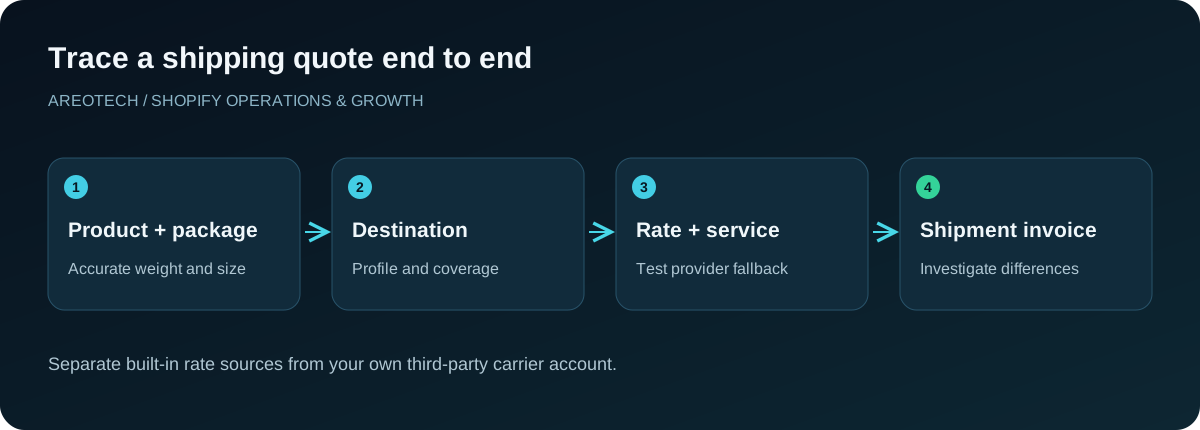
Review profiles and destination coverage
Shipping profiles determine which rules apply to the products in a cart. Create an inventory of general and custom profiles, their locations, zones, and rates. Identify products assigned to a special profile because of size, supplier, or handling requirements.
Test the boundaries between zones. A Canadian store may need different coverage for local delivery, remote destinations, and international shipping. Make sure exclusions reflect a deliberate business decision rather than an accidentally omitted province or postal destination.
Use a mixed-profile cart in the test matrix. Customers rarely know how your internal profiles are organized, and they should not need to understand them to buy. Inspect the final choices shown at checkout, including whether combined shipping charges remain understandable.
Select services you can fulfill consistently
Expose services according to the promises your warehouse can meet. A fast carrier transit service is not useful if the order waits several days for picking. Separate preparation time from transit time in the delivery explanation.
Review service names with customer support. Internal abbreviations may be familiar to shipping staff but unclear to shoppers. Use supported naming options carefully and avoid changing a service label into a stronger guarantee than the carrier provides.
Check carrier notices before major campaigns. If a service becomes unavailable or disrupted, staff need an approved alternative and a way to explain changed expectations. Keep that response process with shipping configuration, not solely in one employee's inbox.
Decide how the business handles shipping cost
Calculated shipping is an input to commercial policy. You may pass through a rate, absorb part of it, add a justified handling amount, or offer a separate promotion. Record the decision so finance and support understand the amount shown to customers.
Evaluate the effect using representative order margins. A shipping subsidy that is manageable for a small replenishment order may be expensive for a bulky mixed cart. Consider packaging and operational effort alongside the carrier quote when reviewing contribution.
Avoid presenting an estimate as a guarantee that no later adjustment is possible. The final shipment can differ from the checkout assumptions. If the business chooses to absorb those differences, measure them internally so the policy remains informed.
Configure a deliberate failure response
A rate provider can be temporarily unavailable even when the store configuration is correct. Review the supported backup-rate settings for the chosen integration and test what the customer sees when no calculated response arrives.
Shopify distinguishes backup rates from ordinary flat rates: an eligible flat rate may appear alongside working calculated options, while backup behaviour is conditional. Verify the exact setup rather than assuming a flat option will only appear during an outage.
Choose fallback amounts and destinations that the business can honor. A very low universal fallback can turn a brief service interruption into expensive accepted orders. If some products cannot ship safely under fallback conditions, define how that exception reaches a reviewer.
Build a representative checkout test matrix
Include nearby urban, distant urban, rural, and remote destinations that your store actually serves. Add a cross-border destination if relevant. Use valid test addresses through approved procedures and avoid completing unnecessary real purchases.
For each destination, test a common single product, a multi-item order, a bulky item, and a mixed-profile cart. Record the services displayed, quote, currency, and delivery wording. Keep the cart composition precise enough that someone else can reproduce it.
Repeat on mobile and with a discount where discounts affect your shipping rules. Test thresholds immediately below and above the boundary. The goal is to discover gaps in the customer's actual decision path, not merely prove that one carrier response can appear.
Diagnose missing rates from the outside inward
Start with the customer's exact cart and destination. Confirm the products require shipping, have usable weights, belong to the intended profiles, and are associated with the correct locations. Check service coverage before regenerating credentials or reinstalling an app.
Next, inspect the carrier connection and any available error details. Ask whether the provider received the request and why it could not return a supported service. A clear reproduction helps distinguish account problems from unsupported parcels or destinations.
Keep notes about successful and failed combinations. If one item causes every cart to fail, investigate that item's configuration. If every cart fails after a connection change, investigate the integration. This approach narrows the cause before broad changes introduce additional uncertainty.
Explain high rates with evidence
Compare the quote against the same carrier account, origin, destination, package, weight, and service. A public retail calculator is not necessarily comparable to a contracted account or an app using different shipment assumptions.
Inspect handling adjustments, currency, parcel selection, and mixed shipments. An unexpectedly high total may reflect a configuration choice rather than a carrier pricing error. Ask the provider for the request inputs if the interface does not expose them clearly.
Do not lower every rate simply to remove a complaint. First establish whether the amount is inaccurate or whether the business wants to subsidize a legitimate cost. Those decisions require different fixes and should be recorded separately.
Reconcile completed shipments
After launch, compare checkout charges with label purchases and final carrier invoices for a sample of orders. Keep package corrections and service changes visible. A mismatch discovered later can reveal an input that the initial test did not represent.
Group differences by product combination, destination, and packing pattern. If a particular set consistently needs a larger box, fix its package model or commercial policy. Avoid obscuring the pattern by distributing every adjustment across the entire catalogue.
For border charges, use the Canada to US duties guide. Transportation rates and duties are related to the same order but should not be treated as one unexplained shipping amount in your reconciliation.
Keep a shipping change log
Record changes to rates, accounts, package definitions, profiles, services, and fallback settings. Include the reason, owner, date, and test evidence. When checkout behaviour changes unexpectedly, this history provides a useful starting point.
Recheck the matrix after new fulfillment partners, major catalogue changes, or packaging revisions. Include shipping in your store maintenance process so it receives the same attention as theme and app updates.
If you need help tracing a quote from checkout to fulfillment, request an AreoTech audit. Bring representative carts, package measurements, carrier details, and invoices. Those records make it possible to identify a specific correction instead of guessing at a general shipping problem.