
To reduce Shopify app costs, start by connecting each charge to a job your store still needs. A subscription may be inexpensive yet unnecessary, while a costly integration may prevent hours of manual work or protect fulfilment accuracy. Cutting by price alone misses that distinction.
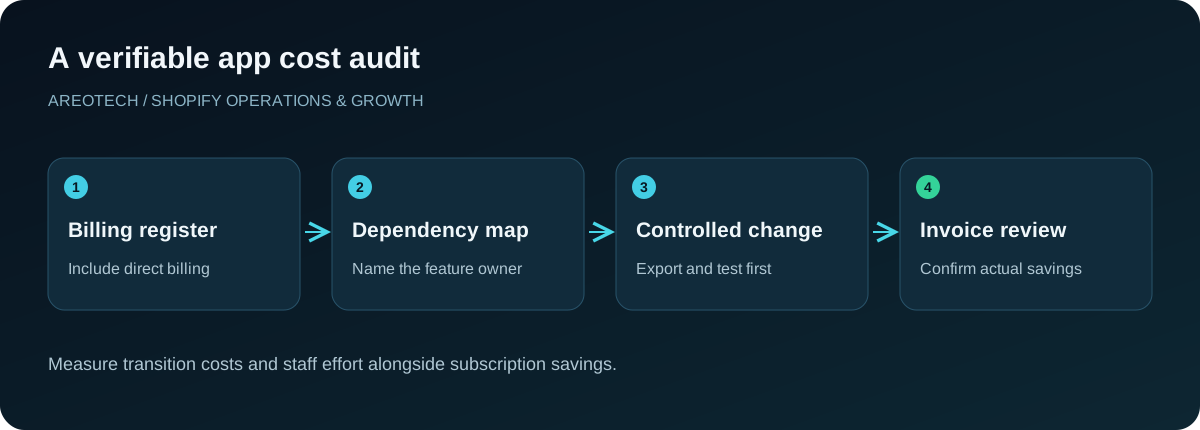
The most useful audit combines billing evidence, feature ownership, dependency checks, and a safe removal plan. It also includes subscriptions paid directly to vendors, because those charges may not appear on your Shopify invoice.
This guide provides a repeatable process for finding savings without turning a routine cost review into a broken checkout, missing reviews, or a disconnected warehouse. The target is a smaller justified operating cost, not an arbitrary minimum number of apps.
Build a complete app and subscription register
List installed apps, sales channels, and external services used by the store. Record the provider, business owner, billing method, renewal date, pricing basis, and the feature people actually use. Include annual contracts and services inherited from a previous agency.
Shopify's app management documentation describes where to review app billing, usage charges, permissions, and history. Use those records alongside invoices and vendor accounts. An app name on a bank statement may differ from its familiar storefront name.
Assign an owner even when nobody remembers the original installation. The owner's first task is to discover whether the app supports a live process. “Nobody opens its dashboard” is not enough to conclude that an automated integration has stopped providing value.
Calculate the actual monthly equivalent
For each service, separate recurring subscription fees, usage charges, one-time charges, and taxes. Convert annual commitments to a monthly equivalent for comparison while preserving their actual renewal dates. Otherwise an annual payment can disappear from an ordinary monthly review.
Use several recent billing periods when usage fluctuates. An email platform, shipping tool, or product-feed service may cost more during a promotion than during a quiet month. Record the pricing driver, such as messages, orders, contacts, or catalogue size.
Shopify's app billing guidance explains why app billing cycles and Shopify invoices may not align. Compare service periods and incurred charges before assuming a post-removal invoice means cancellation failed.
Define the job each app owns
Write the app's purpose as an outcome: synchronize warehouse stock, collect verified reviews, recover eligible checkouts, or display product options. Avoid descriptions that simply repeat the vendor's marketing category. The outcome makes alternatives easier to compare.
Then list the workflows, pages, data, and people that depend on it. A review app might own product widgets, email requests, structured data, and historical reviews. Removing only its visible widget does not address the rest of its role.
Ask the owner what would happen if the app stopped tomorrow. A precise answer identifies the real dependency. A vague answer signals a need for investigation, not immediate removal. Record what evidence would establish that the feature is unused.
Find overlapping capabilities with a feature map
Map jobs against providers. Look for several popup builders, overlapping upsell widgets, duplicate analytics pixels, or more than one system sending the same marketing message. Mark which implementation is active on the storefront and which is merely available in a subscription.
Choose an owner for each shared feature. A platform can contain a capability without implementing it as well as a dedicated tool for your needs. Compare the actual requirements, data portability, support, and operational effort before consolidating.
Use our Shopify app selection guide when defining those requirements. A feature list is a starting point; the decision depends on whether the feature works in your theme, markets, product model, and team process.
Check native capabilities before buying replacements
Review what your current Shopify plan, theme, and already-installed tools can support. A paid app introduced years ago may cover a need that your present setup can now handle adequately. Confirm the exact configuration instead of assuming feature availability from an old comparison article.
Build a small proof of concept for the proposed alternative. Test the customer journey and the staff workflow, including an exception. For example, replacing a form tool requires checking submission delivery and spam handling, not just whether a form renders.
Avoid upgrading the entire Shopify plan to remove one small subscription without comparing total cost. Include any benefits the upgrade genuinely provides, but do not count features the store has no plan to use. Evaluate the full decision over the same period.
Downgrade unused capacity before replacing a good tool
Inspect whether the current tier matches actual usage. Some teams retain premium features after a temporary campaign ends, or pay for seats assigned to people who no longer use the system. A downgrade can preserve a reliable integration while removing unused capacity.
Check what disappears at the lower tier. Historical reporting, automation limits, support levels, export access, or integrations may matter more than the headline usage allowance. Ask the owner to approve the practical trade-offs with representative tasks.
For usage-based services, investigate the source of demand. Duplicate event delivery, unnecessary background syncs, and redundant messages can increase consumption. Fixing the process may reduce both costs and operational noise without requiring a platform migration.
Distinguish storefront performance from app count
An app that works only in the background has a different performance profile from one loading scripts, images, and widgets on every page. Count is therefore a weak measure of storefront impact. Inspect what loads and which customer interactions it affects.
Measure representative product, collection, and cart journeys before a change. Use comparable devices, connection conditions, and page content. If a widget is disabled, verify whether its supporting assets still load before crediting the change with a performance improvement.
The Shopify mobile speed guide provides a framework for prioritizing measured bottlenecks. A cost-saving exercise can create a speed benefit, but treat that as something to verify rather than promise for every removed app.
Assess the full cost of custom replacements
A custom feature has design, implementation, testing, monitoring, and maintenance costs. Someone must own compatibility with future platform and theme changes. It may be a good choice for a narrow stable requirement, but a subscription comparison alone cannot establish that.
Write down the smallest required feature set and the exceptions. A simple internal export differs substantially from replacing a mature returns system with labels, accounting, exchange logic, and customer notifications. Be explicit about which capabilities the replacement will support.
Compare costs over a realistic ownership period, including the possibility that the original developer becomes unavailable. Keep documentation and an operational fallback. A cheap build that nobody can repair during a promotion is an expensive dependency.
Export data and capture configuration before removal
Identify what the app stores outside Shopify: reviews, loyalty balances, form submissions, templates, configuration, or historical reporting. Export the records you need and confirm that another person can open and interpret them. An unreadable archive is not a tested migration asset.
Capture active settings, feature locations, credentials ownership, and vendor instructions. Do not copy secrets into a public project or shared document. Record where they are managed and who can access the provider account when needed.
Shopify's uninstall guidance warns that some apps require additional theme cleanup and that reinstallation may not restore old settings or data. Plan removal as a transition with verification, rather than relying on reinstall as a complete rollback.
Remove one dependency at a time
Choose a quiet operating window and document the expected changes. Prepare the replacement first where needed, then switch feature ownership deliberately. Avoid having both providers simultaneously change the same inventory, send the same message, or write the same analytics event.
After removal, check the affected customer journey from start to finish. Inspect product pages, cart behaviour, checkout handoff, account features, and confirmation messages as relevant. Ask the operational owner to verify downstream records, not just the storefront appearance.
If the app manages inventory at its own location, resolve that stock and fulfilment dependency before uninstalling. Maintain a short recovery plan with named owners and clear stop conditions. Changes involving fulfilment deserve more preparation than retiring an unused decorative badge.
Verify that the financial change actually happened
Record the removal or downgrade date and retain the provider confirmation. Check whether there is a separate external subscription to cancel. Review the next expected invoice and distinguish valid previously incurred charges from unexpected recurring fees.
Track both gross subscription savings and new costs. If the team now spends additional time manually exporting orders, include that workload in the decision review. A lower app bill with higher operational costs may still be acceptable, but it should be an informed choice.
Use a simple savings ledger: previous recurring cost, new recurring cost, transition cost, effective date, and evidence. Label estimates until the first relevant billing cycle confirms them. This makes the audit credible without inventing a percentage saving in advance.
Make the next audit easier
Require a short business case before installing another app: the problem, owner, expected cost, success measure, and review date. Assign someone to decide at the end of a trial. Otherwise trials become subscriptions through inattention rather than demonstrated value.
Keep the app register with your store's operating documentation and review it after major campaigns, staffing changes, or platform migrations. Include vendor ownership and renewal access so that a former employee's inbox does not become the only path to cancellation.
For a store with tangled integrations, AreoTech's maintenance service can map dependencies, test replacements, and verify removals. The lasting benefit is a store where every recurring tool has a clear purpose and an accountable owner.
Work through one illustrative decision
Imagine a store paying for two separate tools that both display product recommendations. The team should first identify where each widget appears, which rules it uses, and whether either system supports another active feature. It can then reproduce the required recommendation placement with the preferred provider in a duplicate theme and compare behaviour on representative products.
The decision record should include the subscription that can end, the migration effort, any data export, and the date savings should begin. After the switch, inspect the storefront and the next relevant invoice. If the retained tool needs a more expensive tier, subtract that increase from the proposed saving. This example does not predict a particular financial result; it demonstrates how to turn an apparent overlap into a verified decision. Apply the same reasoning to forms, popups, reporting, and marketing tools, while giving operational integrations a deeper dependency review.
Frequently asked questions
What should I remove first?
Start with a confirmed unused tool that has no live data, billing, inventory, or workflow dependency. Use it to establish the audit process before changing systems that process orders or customer records.
Can I cancel an app from its own dashboard?
Follow the provider's process and verify Shopify installation and billing status as well. External subscriptions and Shopify-billed subscriptions require different checks; keep confirmation for both where applicable.
How often should I review app spending?
Set a regular cadence that fits the store, with extra reviews before renewals and after major projects. Consistent ownership is more effective than a rushed annual cleanup when nobody remembers why tools were installed.