A Shopify collection page sits between a broad need and a specific purchase. Someone searching for a waterproof daypack may want to compare capacity, materials, and fit before choosing a product. A useful collection helps them make that comparison while giving search engines a clear, accessible view of the assortment.
Shopify collection page SEO therefore involves more than adding keywords below a product grid. The page needs a distinct purpose, appropriate products, helpful information, reliable links, and a usable mobile experience. Optimizing one element while ignoring the others produces a page that can be technically tidy yet commercially weak.
This guide explains how to plan and review collections as durable shopping destinations. It also covers the boundaries between genuine categories, temporary campaigns, and filter combinations so the store does not accumulate competing pages for the same customer need.
Start with a specific shopping intention
Describe what a customer should accomplish on the page. “Find a lightweight daypack for commuting” is more useful than “target backpack keywords.” The first statement tells you which products and decision criteria belong in the collection.
Review customer searches, support questions, current search queries, and actual assortment. Group phrases by meaning rather than spelling. Several variations may describe the same need and fit one strong page, while similar-looking phrases can imply different products or usage requirements.
Write a short purpose statement for each important collection. Use it to resolve future merchandising decisions. If a product does not satisfy the promise, adding it merely to increase the number of items can weaken the page for both shoppers and the team maintaining it.
Map each intention to a maintained URL
Create a simple inventory of existing collection URLs, their purpose, stock depth, and search performance. Look for several pages competing to represent the same category, especially collections left behind after campaigns or agency changes.
Choose a stable destination for recurring needs. A permanent seasonal category can often be refreshed each year instead of creating a new nearly identical URL every time. Keep dated campaign pages only when their separate purpose remains useful.
Do not remove overlapping pages solely because a spreadsheet highlights similar words. Review their links, demand, customer journeys, and history. Consolidation requires a considered destination and appropriate redirects, not a blanket cleanup based on title similarity.
Build navigation that exposes the assortment
Link important collections from relevant menus, parent categories, or editorial content. Make the hierarchy understandable to a first-time visitor. A collection hidden behind a site-search query is difficult to discover through ordinary browsing.
Google's ecommerce navigation guidance explains the role of links between categories and products. Use ordinary crawlable links and ensure the products you want discovered are reachable through the store's structure.
Audit the route with JavaScript-heavy widgets in mind. A visually clickable tile does not automatically provide the same discoverable link as a conventional anchor. Ask a developer to inspect rendered markup where a custom filter or page builder controls navigation.
Make the first screen useful
The collection heading should describe the category plainly. A short introduction can explain the selection and a useful distinction, such as intended activity or material. Avoid placing a long generic essay between the shopper and the products.
Show practical controls where customers expect them. Sorting, relevant filters, product count, and understandable availability can help shoppers assess whether the page contains what they need. Review how these controls behave on a narrow screen rather than only in a desktop theme preview.
Treat banners as part of the buying experience. A large promotion that pushes all products out of view should earn its space by providing valuable information. Decorative content can make a page look polished while slowing the customer's first meaningful action.
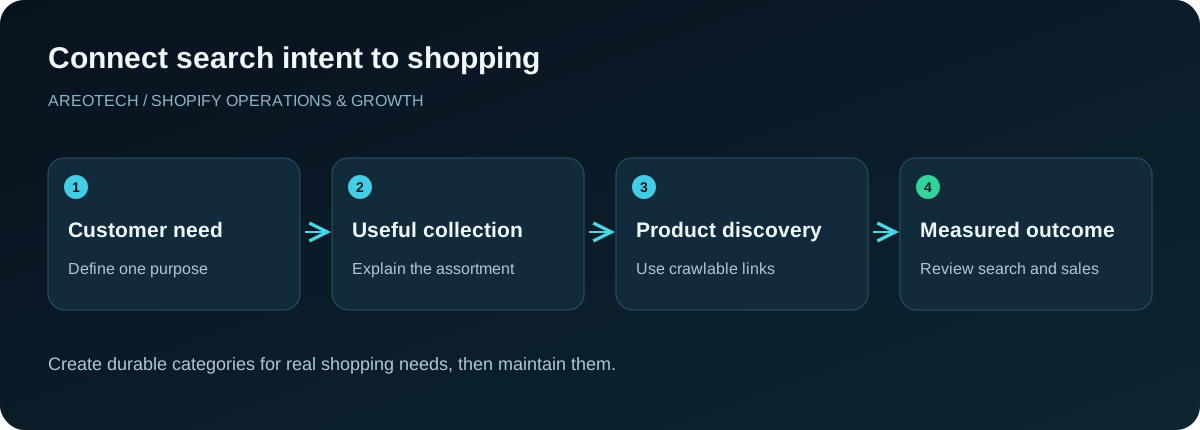
Write copy that supports a choice
Explain distinctions customers cannot infer from thumbnails alone. Discuss capacity, compatibility, materials, intended use, or fit when those details are relevant to the assortment. Use concrete product knowledge instead of repeating that every item is premium and perfect.
Place concise orientation near the top and deeper buying guidance where it fits the design. There is no universal paragraph count that makes a collection optimized. The question is whether the information helps someone narrow the choice without obstructing browsing.
Avoid copying supplier descriptions or rotating the same paragraph across categories with one noun changed. Each collection should explain why this group exists. If you cannot articulate that difference, reconsider whether the page serves a separate customer intention at all.
Match metadata to the actual page
Write a specific title that reflects the category and useful distinguishing context. A searcher should recognize the destination after clicking. Avoid squeezing every related phrase into a title that reads like a list of competing categories.
Use the description to explain the selection and a genuine reason to explore it. Keep delivery, availability, and promotional claims current. A description advertising a discontinued offer creates unnecessary friction even if the rest of the page remains accurate.
Shopify's SEO overview is a useful reference for available editing controls and platform defaults. Verify the final rendered output after a theme or SEO-app change rather than assuming the admin field is always the only source.
Distinguish useful filters from search landing pages
Filters help shoppers refine a category, but every combination does not need a separately promoted page. Colour, size, price, stock status, and sort order can produce many URLs with little distinct value.
Evaluate a potential landing page by demand, assortment depth, and maintainability. A well-stocked category for a clear use case may deserve its own collection. A combination that usually contains one unavailable item is unlikely to become a useful durable destination.
Google's faceted navigation guidance explains the crawl considerations behind this decision. Have a developer review the actual URL patterns and existing controls before changing robots rules, canonicals, or indexing directives across the store.
Keep pagination and load-more behaviour discoverable
Large collections often load more products through a button or infinite scrolling. Test whether later products have accessible page URLs and crawlable links. The fact that a person can trigger another batch does not establish that all items are equally discoverable.
Google's pagination documentation describes the differences between these patterns. Review the implementation with that guidance rather than treating infinite scroll as automatically good or bad for search.
Check practical navigation too. A shopper should be able to open a product and return without losing their place unnecessarily. Preserve useful state where appropriate, and make loading feedback clear so people do not repeatedly press a control that is already working.
Use product cards as decision tools
Show the information people need to decide which product deserves a closer look. Clear names, representative images, accurate prices, and meaningful variant or availability cues usually matter more than decorative badges.
Inspect image crops across the assortment. A bag, long garment, and small accessory may need different photography treatment to remain understandable in the same grid. Use alt text that describes the useful subject rather than repeating a sequence of category keywords.
Keep claims and ratings accurate. A collection-wide badge should not imply that every product shares a certification or review score unless that is true. Structured data and visual merchandising should both describe the actual items customers can purchase.
Avoid treating a category as one product
An assortment of different products is not one purchasable product merely because it appears on a single page. Google distinguishes individual product experiences from general category listings in its merchant listing guidance.
Ask a developer to inspect markup introduced by themes, review apps, and SEO tools. The aim is coherent information about the page, not the largest possible number of schema objects. Do not invent an aggregate category price or rating to satisfy a plugin's checklist.
If Search Console reports product issues associated with a collection, identify the generating source before editing the catalogue. Our product schema troubleshooting guide explains how to separate source conflicts from missing product information.
Maintain empty and seasonal collections deliberately
A temporarily empty category needs a business decision. Will stock return soon? Does the page still provide useful information or links to genuinely relevant alternatives? Is the collection permanently retired? Each situation calls for a different response.
Avoid redirecting every empty collection to the homepage. That can leave visitors without the context they expected. When retiring a page, select an appropriate replacement only when it meaningfully serves the same purpose and update internal links accordingly.
For seasonal collections, prepare a maintenance calendar. Keep dates, images, products, and delivery messages aligned with the current campaign. A stable URL is useful only if someone keeps the destination accurate when the season changes.
Review mobile performance in context
Test the grid, filters, sort control, menu, and product links on a real phone. Watch for layout movement, delayed filter responses, and overlays that cover results. A collection can load quickly yet remain difficult to use.
Compare performance before and after adding recommendation widgets, video banners, or extensive product imagery. Use representative pages and repeatable conditions. Our mobile speed optimization guide provides a practical framework for separating loading, responsiveness, and stability problems.
Do not sacrifice necessary product detail simply to improve a score. The purpose is an easier shopping journey. Measure whether the page shows useful choices promptly and lets customers interact reliably, then investigate the technical work preventing that outcome.
Measure collections as landing pages
Track relevant search impressions, clicks, landing sessions, product visits, and purchases using consistent definitions. Segment branded and non-branded demand where useful. A change in total traffic can conceal a different mix of shoppers or campaigns.
Keep a dated record of content, navigation, assortment, and template changes. Compare periods with awareness of stock, seasonality, and promotions. Avoid crediting a new paragraph for every sales increase that happens during a concurrent discount campaign.
Use a few representative collections for an initial rollout. Document the hypothesis and expected customer benefit. If the change improves clarity or discovery without harming usability, expand the pattern where the same conditions apply rather than forcing it across every category.
Make collection maintenance an owned process
Give merchandising responsibility for assortment and commercial accuracy, content staff responsibility for guidance, and development responsibility for rendering and technical controls. Assign one person to coordinate when those responsibilities intersect.
Review new collection requests against the purpose inventory before creating another URL. This small step prevents a store from slowly accumulating duplicate categories that nobody intends to maintain. Keep obsolete campaign pages in the same review process.
For a broader assessment, use the Shopify SEO audit checklist or request an AreoTech audit. Bring important collection URLs, current search data, and examples of customer questions. Those inputs support specific improvements to discovery and shopping decisions.