
When Shopify products are not indexed by Google, the first useful question is which products and which URLs. A missing bestselling product, a duplicate collection route, and a newly published item can look similar in a spreadsheet while requiring completely different responses. Installing another SEO app before making that distinction often adds settings without resolving the cause.
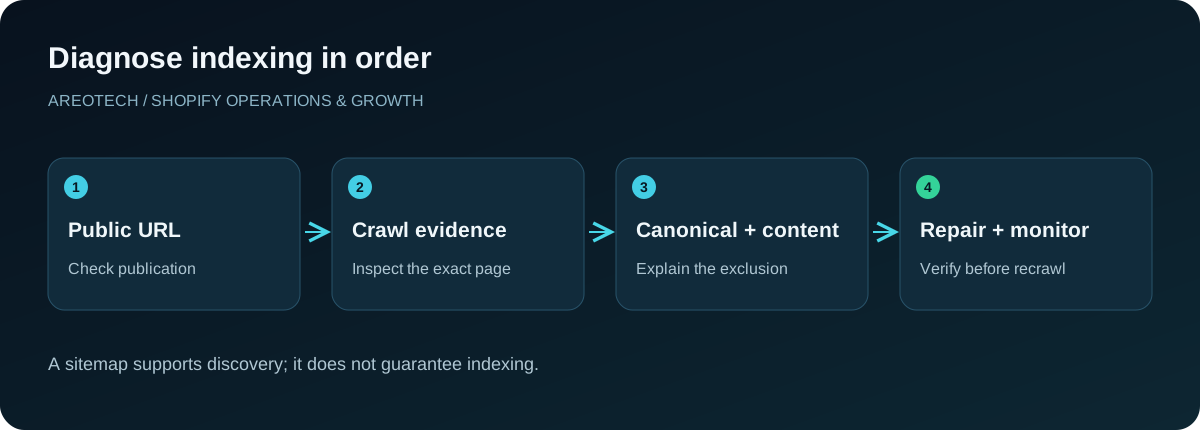
This guide turns the complaint into a manageable investigation. You will build a representative sample, check what Google actually knows, identify the responsible template or publishing rule, and track a repair without promising an indexing deadline. The aim is to make valuable product pages accessible, understandable, and worth including in search.
Separate indexing from visibility
An indexed product may receive no impressions for the phrase you are checking. That is a visibility problem, not proof that Google excluded the page. Conversely, an item in a shopping feed does not establish that its storefront URL is indexed in ordinary search.
Start with URL Inspection in the correct Search Console property. Record whether the inspected URL is indexed, what canonical Google selected, and when the available crawl happened. Treat a manual search as a supporting observation rather than the deciding test. Search results vary, and a broad query is a poor diagnostic instrument for one product.
Build a small, informative sample
Choose ten to twenty products across meaningful groups: recent launches, established bestsellers, items imported together, different product templates, and products sharing the same supplier description. Include at least two products known to be indexed for comparison.
Create columns for product handle, public URL, publication date, template, current availability, inspection status, selected canonical, and last relevant change. Add an owner and next action. The purpose is not to catalogue every URL immediately; it is to discover a repeatable pattern.
If every affected item uses one custom template, investigate that template before rewriting the entire catalogue. If only yesterday's launches are missing, the evidence points somewhere else.
Confirm that the public product exists
Open the exact URL in a signed-out browser. Check whether it shows the expected product, redirects elsewhere, requests a password, or returns an error. An admin preview is not evidence that a shopper or crawler can access the published page.
Verify the product's publication settings for the Online Store and the relevant market. Record any deliberate restrictions before changing them. Wholesale exclusivity, launch embargoes, and market availability can be commercial requirements.
Also check the domain. A copied preview address, obsolete subdomain, or old product handle can send the investigation down the wrong path. Use the public URL your navigation and campaigns actually promote.
Read the exclusion reason carefully
Google's Page indexing report documentation explains the difference between discovered pages, crawled pages, duplicate selections, redirects, and explicit exclusions. These labels describe different stages and outcomes; they are not interchangeable error codes.
Group the sample by reason, then assign a suitable investigation to each group. A redirect requires checking its destination. A page excluded by a directive requires checking who supplied that directive. A crawled page needs examination beyond whether the URL exists.
Do not make the total number of non-indexed URLs your success metric. Stores can contain legitimate duplicates and intentionally excluded pages. Focus on the preferred pages that should serve customers through search.
Compare live and recorded evidence
Search Console can show an earlier indexed version while the current website has already changed. Keep the historical inspection result separate from the live test. Record both timestamps in your investigation log.
For example, a repaired product template may now expose its description correctly, but the recorded crawl may predate the repair. Rewriting the page again at that point introduces another variable before the first change can be evaluated.
The opposite matters too: an older successful crawl does not prove today's release is healthy. Check the live URL after theme updates, password changes, domain work, or major app installations affecting product rendering.
Inspect noindex and crawling restrictions
A developer should inspect the response and rendered page for indexing directives, including directives introduced by themes or SEO integrations. Check the actual affected URL rather than assuming that every product shares the same configuration.
Google's noindex guidance distinguishes preventing indexing from preventing crawling. Google needs access to encounter a page-level noindex instruction; blocking crawling is not a reliable substitute for that instruction.
Before removing a rule, establish its purpose and scope. A condition intended for internal search pages can accidentally reach product pages, but an intentional restriction should not be discarded indiscriminately. Save the existing configuration and verify the narrower correction on a draft theme where possible.
Check the preferred canonical URL
One Shopify product can be reachable through several paths or parameter combinations. Inspect the page's declared canonical and compare it with Google's selected canonical. Then open the selected URL and confirm that it represents the intended product.
Google describes canonical annotations as signals in its canonical URL guidance. Keep internal links, sitemap entries, redirects, and canonical declarations consistent with the preferred address.
A duplicate route being excluded while its preferred product URL is indexed can be normal. An unrelated product, obsolete domain, or collection homepage being selected deserves investigation. Avoid solving apparent duplication by adding noindex to every alternative path without understanding the existing relationships.
Verify the generated Shopify sitemap
Shopify automatically maintains its sitemap and related product sitemap files. Follow its sitemap submission instructions to locate the files and submit the appropriate domain's sitemap in Search Console.
Check several affected product URLs against the relevant product sitemap. A missing entry should trigger a review of publication and URL assumptions. An existing entry establishes discovery information, not an indexing guarantee.
Record the submitted sitemap address and any processing issue. Avoid creating competing sitemap systems merely because indexing is slow. Extra submissions do not compensate for a blocked page, inconsistent canonical signals, or product content that fails to distinguish the item.
Restore useful internal discovery paths
Walk through the store as a new visitor. Can you reach the product from a relevant collection without using the search box? Does that collection appear in understandable navigation or another important browsing path?
An imported product may be technically published yet absent from the collections customers use. Fix the merchandising relationship as well as the link. Place the product where its material, purpose, compatibility, or audience makes sense.
Use descriptive links in relevant guides and related product sections. A link from a genuine buying guide can help someone evaluate the item; a huge footer list of unrelated products creates maintenance work and weak browsing. Our product listing SEO guide covers the content side of this relationship.
Examine the actual product information
Compare an affected product with an indexed peer and with the information a customer needs. Does the page explain dimensions, included components, compatibility, use, care, and limitations where relevant? Does it identify what makes this item different from adjacent options?
A supplier paragraph reused across many items may leave important buying questions unanswered. Replace vague promotional claims with verified details supplied by merchandising or product specialists. Use original photographs when available and describe meaningful differences between models.
This is not a request to inflate every description to a fixed word count. A simple accessory needs different information from a technical assembly. Improve usefulness and distinctness, then preserve that quality in future imports.
Test rendering dependencies
Some custom product experiences obtain essential information only after scripts run or a visitor makes a selection. Ask the developer to compare the initial response, rendered result, and what the inspection tools can retrieve.
Pay particular attention to missing titles, descriptions, product links, and error states caused by a failed app request. A page that looks complete after an administrator's cached session may behave differently for a new visitor.
Keep performance and indexing investigations related but separate. A slow page is not automatically unindexable. Document the specific missing content or access failure before proposing a rendering change. Use our mobile speed optimization guide when loading behaviour also needs attention.
Handle unavailable products deliberately
Temporary stock shortages and permanent discontinuations deserve different decisions. An established product that will return may still answer useful questions and help shoppers find alternatives. Preserve accurate availability information and avoid pretending the item can be purchased immediately.
For a permanently retired product, decide whether a closely matching replacement exists and whether redirecting serves the visitor's original intent. Do not redirect every retired product to the homepage as a blanket housekeeping rule.
Maintain a small retirement register containing the old URL, reason, chosen treatment, and replacement if applicable. That record is especially valuable when seasonal products return or an old campaign continues sending visits months later.
Investigate migrations as a separate pattern
If exclusions began after a platform move, domain change, or handle cleanup, compare old and new URL mappings. Check several redirects end to end, including products with punctuation, renamed categories, or merged variants.
Confirm that new navigation points directly to the final addresses. A redirect that eventually reaches a valid page can conceal unnecessary chains or a mistaken intermediate destination. Document examples for the migration owner rather than making isolated changes without a complete map.
Our WooCommerce to Shopify migration guide provides a broader handover process. Indexing recovery should be connected to that migration evidence, including launch dates and known exceptions.
Request a recrawl after verifying the repair
Once an important URL passes your live checks, request indexing through URL Inspection where appropriate. For a larger affected set, keep the sitemap accurate and ensure the underlying shared issue is resolved.
Google's recrawl documentation states that repeated requests do not accelerate crawling and that a request does not guarantee inclusion. Give the team that expectation before promising a launch outcome.
Record the repair date, evidence, and submission date. Set a review appointment rather than checking the same URL compulsively throughout the day. Continue other useful catalogue work while Google processes the change.
Measure recovery by cohorts
Track the original sample and the broader affected group separately. Count how many intended canonical products became indexed, how many remain excluded for the original reason, and how many now show a different status.
Then examine impressions and visits for the recovered group over a sensible comparison period. Indexing creates the possibility of visibility; it does not establish that the page satisfies competitive searches or will immediately produce sales.
Keep launches, stock changes, promotions, and seasonal demand in the same reporting notes. Without that context, a traffic movement can be mistakenly attributed entirely to the technical repair. Preserve a few unaffected comparison products where the catalogue allows it.
Give the investigation a clear finish
A useful handover identifies the affected pattern, the change made, representative passing checks, outstanding exceptions, and the next review date. Assign ownership for recurring causes such as product imports or theme updates.
If important products remain excluded after access, canonicalization, and content checks, gather the evidence before escalating. Include inspection screenshots, exact URLs, timestamps, and the recent change history. That package makes a specialist review far more productive than a general complaint about Google ignoring the store.
AreoTech can help connect these findings to a wider Shopify SEO audit, prioritizing products that matter commercially and fixes your team can maintain.